How to Take Photos with a Galaxy Watch7 or Watch Ultra

How to Take Pictures Using Samsung Galaxy Watch7 or Watch Ultra
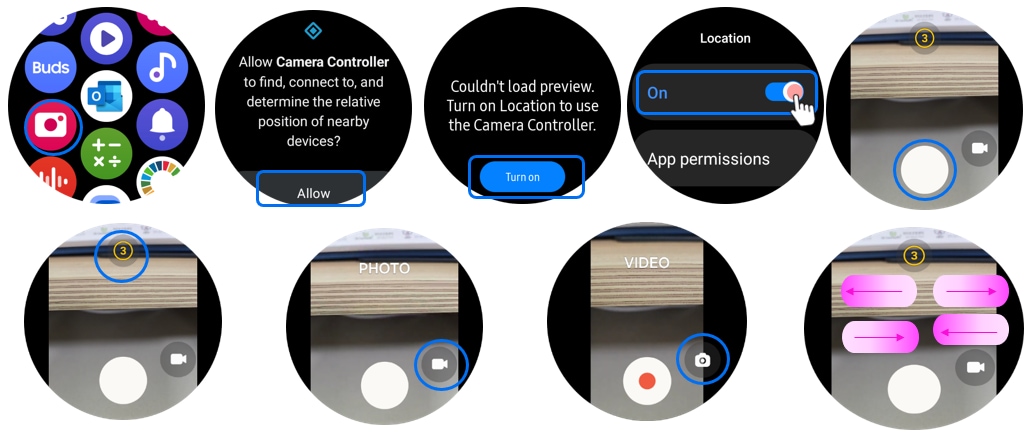
You can take pictures using your Samsung Galaxy Watch7 or Galaxy Watch Ultra by enabling the Camera Controller feature. This allows you to remotely control your connected phone's camera, adjust settings like zoom, and capture photos or videos directly from your watch.
1. How to Enable Camera Controller on Your Watch
- Open the Settings app on your Samsung Galaxy Watch7 or Galaxy Watch Ultra.
- Scroll down and tap on Camera Controller.
- Tap Allow to grant permissions for the feature.
- Toggle the switch to Turn on Location if you want to tag your photos with location data.
2. Supported Samsung Galaxy Devices
The Camera Controller feature is compatible with Samsung Galaxy Watch7, Galaxy Watch Ultra, and other Samsung Galaxy smartwatches that support remote camera control. Ensure your watch and phone are connected via Bluetooth for seamless functionality.
3. Why Use Camera Controller?
- Capture photos or videos from a distance without needing to hold your phone.
- Adjust camera settings like zoom, flash, and timer directly from your watch.
- Ideal for group photos, selfies, or situations where holding your phone isn't convenient.
4. Additional Things to Check
- Ensure your watch and phone are paired and connected via Bluetooth.
- Make sure your phone's camera app is open and accessible for remote control.
- Check for software updates on both devices to ensure optimal performance.
5. Related Samsung Support Topics
Thank you for your feedback!
Please answer all questions.