Track Calories with Galaxy Fit3
How to Track and Manage Daily Calorie Intake on Samsung Galaxy Fit3
The Samsung Galaxy Fit3 allows you to monitor your daily calorie intake and set personalized goals to support your fitness journey. By logging meals, reviewing nutritional data, and adjusting your caloric targets, you can maintain a balanced diet and track progress toward your health objectives.
1. How to Record Daily Calorie Intake on Galaxy Fit3
- Open the Health app from the Apps screen.
- Select Food to access the calorie tracking feature.
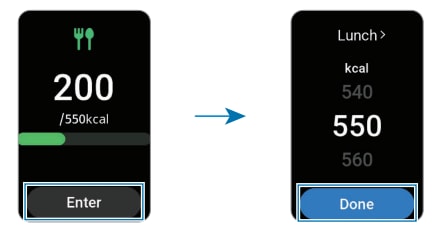
- Tap Enter, then choose the meal type (e.g., breakfast, lunch, dinner, or snack).
- Swipe up or down to adjust the caloric intake value and confirm with Done.
- For more details about the logged food, swipe up or down on the screen.
2. How to Delete Calorie Logs on Galaxy Fit3
- Go to the Health app on your device.
- Navigate to Food and tap Delete.
- Select the specific entries you want to remove and confirm with Delete.
3. How to Set a Daily Calorie Target on Galaxy Fit3
- Open the Health app from the Apps screen.
- Select Food and tap Set target.
- Swipe up or down to adjust the target calorie value according to your dietary needs.
- Confirm your selection by tapping Done.
4. Why Tracking Calorie Intake Matters
- Monitoring daily calorie intake helps you stay aligned with your fitness goals, whether it's weight loss, maintenance, or muscle gain.
- Comparing actual intake with your target provides insights into dietary habits and areas for improvement.
- Regular tracking supports long-term health by promoting mindful eating and better nutritional choices.
5. Supported Samsung Galaxy Devices
This feature is compatible with the Samsung Galaxy Fit3 and other Galaxy wearables that integrate with the Health app. Ensure your device is updated to the latest software version for optimal functionality.
6. Related Samsung Support Topics
Thank you for your feedback!
Please answer all questions.